
How to Jump Start a Mobility Scooter: Safe Steps for 2026
Could trying to jump-start your mobility scooter turn a flat-battery problem into an electrical fault? If your scooter won’t move when you need it, it’s understandable to look for a quick fix. But how to jump start a mobility scooter is not usually a matter of connecting it to a car battery, and the wrong approach could damage its electrical system.
This guide explains why car-style jump-starting is generally not recommended and what to check before assuming the battery has failed. You’ll learn how to check the key, charger connection, freewheel lever, seat and circuit breaker, then decide whether the scooter needs a full charge, technical assistance or replacement batteries.
If safe checks point to battery failure, identify the battery type and match its voltage and capacity to your scooter before ordering a replacement. We’ll explain what to consider and how to distinguish a worn battery from one that simply needs charging. Follow your scooter manufacturer’s manual for model-specific instructions, and don’t attempt an emergency-start procedure it doesn’t specify.
Key Takeaways
- Don’t assume a car-style jump start is safe for a mobility scooter. Starting methods and electrical systems vary by model.
- Check how the battery and charger work together, and whether your scooter uses more than one battery.
- Use the manufacturer’s manual for safe checks and before attempting any electrical work or emergency-start procedure.
- If charging doesn’t restore power, note the charger response, dashboard warnings, recent storage and when the symptoms occur.
- Choose the next step based on the likely cause: recharge, investigate further or consider correctly matched replacement batteries.
Can you jump-start a mobility scooter safely?
Don’t assume you can jump-start a mobility scooter like a car. Scooter electrical systems and starting methods vary by model. Connecting an external battery without an approved procedure can damage the scooter or create a safety risk. A scooter that won’t start may need charging, but that doesn’t mean it needs an improvised boost.
A mobility scooter uses battery power to operate its motor and controls. Its charging system is designed to recharge the battery using a specified charger. That is different from connecting another power source for a quick boost. For a general overview of how a mobility scooter uses batteries and charging systems, see Wikipedia. For your particular scooter, follow the manufacturer’s manual.
A proper recharge uses the scooter’s specified charger; an improvised boost can damage the scooter or create a safety risk. If you’re researching how to jump start a mobility scooter, first check the manual for an approved charging or recovery procedure. Don’t follow generic car jump-start instructions unless the manufacturer provides a procedure for your model.
Why car-style jump leads are not a default solution
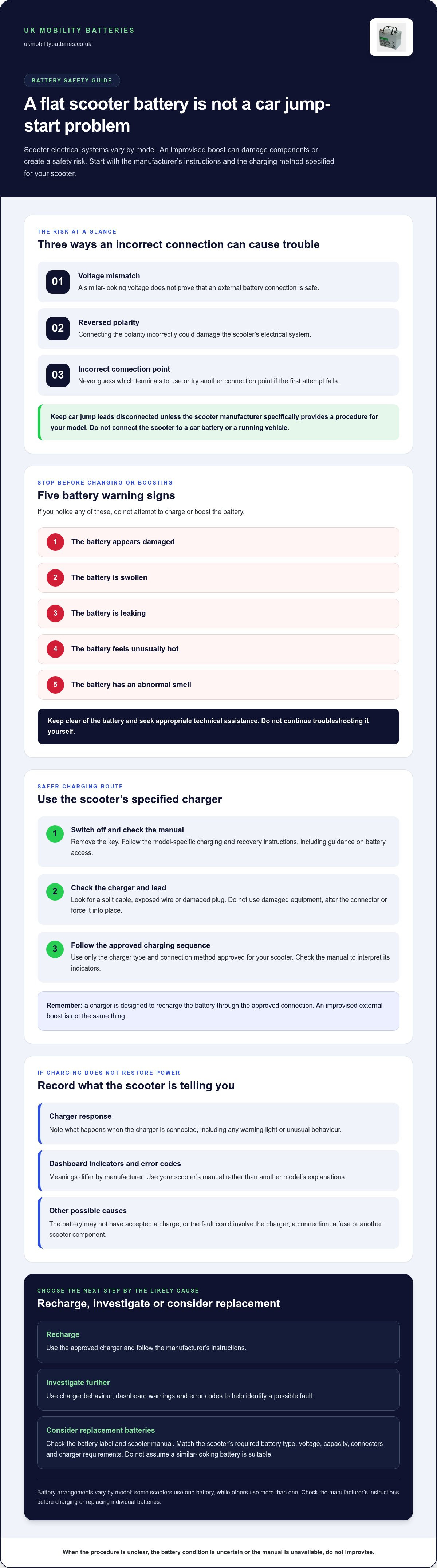
Car jump leads are intended for vehicle starting systems, not as a universal way to power mobility equipment. A voltage mismatch, reversed polarity or incorrect connection point could damage the scooter’s controller, wiring or other electrical components. Even if the battery voltage appears similar, that doesn’t mean the connection is safe.
Don’t connect the scooter to a car battery or a running vehicle. Never guess which terminals to use or try a different connection point if the first attempt fails. Unless the scooter manufacturer specifically instructs you to use jump leads, leave them disconnected and use only the charging method approved for your model.
What to do before touching the battery
Before inspecting the scooter, switch it off and remove the key. Check the manual for the approved charging and recovery procedure, including instructions for accessing the battery compartment. Don’t remove covers or handle wiring to experiment with a connection.
Stop if the battery appears damaged, swollen or leaking, feels unusually hot, or has an abnormal smell. Don’t attempt to charge or boost it. Keep clear of the battery and seek appropriate technical assistance instead of continuing to troubleshoot it yourself. These warning signs call for careful assessment, not a stronger power source.
If there are no visible signs of damage, follow the manual’s checks before connecting the specified charger. Make sure you’re using the charger intended for the scooter, and follow its instructions for connecting and charging. If the manual is unavailable, the battery condition is uncertain or the procedure is unclear, don’t improvise. Identify the fault safely rather than risk turning a no-start problem into electrical damage.
How a mobility scooter battery and charging system work
The battery supplies the electrical energy that runs a mobility scooter’s motor and controls. The charger restores the battery’s charge through the scooter’s approved charging connection. These have different functions: a charger is designed for recharging, while an improvised external boost may not suit the scooter’s electrical system.
Battery arrangements vary. Some scooters use one battery, while others use more than one, depending on the model and system design. If your scooter uses a pair, the batteries may work together as part of its power supply. Don’t assume one can be charged or replaced independently without checking the manufacturer’s instructions.
Voltage, capacity, connectors and charger requirements all need to match the scooter’s design. A battery that looks similar or has a connector that fits may still be unsuitable. Before buying, check the scooter manual and the information on the existing battery. This is central to understanding how to jump start a mobility scooter safely: establish whether the problem is a low charge, an incompatible charging setup or another fault before taking action.
Why a scooter may not start even after charging
A scooter that won’t start after charging doesn’t necessarily need a boost. The battery may not have accepted a charge, or the issue could involve the charger, a connection, a fuse or another part of the scooter. Note what happens when you connect the charger and switch on the scooter. Dashboard indicators and error codes differ by manufacturer, so use the manual to interpret them rather than relying on another model’s explanations.
Charging safely with the specified charger
Use only the charger type and connection method approved for your scooter. Before use, inspect the charger and its lead for visible damage, such as a split cable, exposed wire or damaged plug. Don’t use damaged equipment, alter the connector or force it into place. Follow the manual for the charging sequence and the meaning of the charger’s indicators.
For guidance on charger and battery care, the mobility scooter battery charger compatibility guide covers related charging considerations. Note any warning light, error code or unusual charger behaviour. These details can help distinguish a charging issue from a battery problem.
If checks indicate that replacement may be needed, identify the required specification from the battery label and scooter manual before comparing options. UK Mobility Batteries’ range of mobility scooter batteries includes options to compare with your scooter’s requirements.
Safe checks to try when your mobility scooter will not start
Work through these checks in order, starting with visible conditions and controls. Don’t open the battery compartment or dismantle electrical parts to diagnose a no-start. The safest order is isolate, inspect, charge, then reassess.
- Isolate the scooter. Switch it off and remove the key before looking it over. Stop if you notice battery damage, unusual heat, a burning smell, leaking or other signs of a problem. Don’t continue charging or testing the scooter in these conditions.
- Check the controls and settings. Use the key, power switch and control sequence as described in the manual. Confirm that the freewheel lever is set to drive, not freewheel, and check that the seat is locked in place if your model requires it.
- Check the charge indication. Look at the battery gauge or dashboard display, then use the manual to interpret it. A low reading may mean charging is needed; a warning light or code may indicate another issue. Symbols don’t necessarily mean the same thing on different scooter models.
- Inspect accessible parts. With the scooter switched off, look for visible damage or looseness at accessible connections and inspect the charger lead and plug. Don’t pull wires, remove covers or try to tighten internal connections. If anything looks damaged, stop and seek appropriate technical guidance.
- Use the approved charging procedure. If there are no warning signs, connect the specified charger in the sequence given in the manual. Observe its indicators and compare them with the manufacturer’s guidance. Once charging is complete according to the manual, disconnect the charger as instructed and reassess the scooter.
Check controls, mode settings and visible connections
A simple setting can prevent a scooter from moving even when the battery has charge. Check that the scooter is switched on and that you’ve used its key or control sequence correctly. Confirm the drive or freewheel setting in the manual. Inspect only accessible connections. Don’t dismantle components or improvise a repair if a connection appears damaged.
Charge and interpret the result
Follow the manual’s exact charger connection and disconnection sequence. Note whether the charger indicates charging, shows a fault or gives no response, then compare that behaviour with the manufacturer’s instructions. If a correct charge doesn’t restore power, don’t try a boost. The mobility scooter battery troubleshooting guide can help you consider possible battery-related symptoms.
After these checks, record what you observed: the charge indication, any dashboard warning or code, the charger’s behaviour and whether the scooter’s response changed. These details give you a clearer basis for deciding whether to investigate further or consider replacement batteries. One failed start does not, on its own, prove the battery has failed.
What to do next if charging does not restore power
If the scooter still won’t start after charging, investigate the cause rather than assuming it needs a jump start or that the battery has failed. The fault could involve the battery, charger, a connection or another scooter component. Avoid repeated attempts to boost the scooter. Record what happened during your checks and use the manufacturer’s instructions to guide the next step.
Before seeking model-specific technical diagnosis, make a short note of:
- Charger response: whether it showed a charging or fault indication, or gave no response.
- Dashboard warning: the exact light, message or error code displayed.
- Recent storage: whether the scooter has been unused or stored for a period.
- Symptom timing: whether the problem began suddenly, followed charging or developed during use.
These observations can help distinguish a charging concern from a starting or operating fault. Follow the manual’s guidance for interpreting indicators and arranging technical support for your model. Don’t bypass a fuse, bridge battery terminals, open a sealed battery or dismantle electrical components to find the cause.
Clues that may point towards battery wear
Repeated loss of charge or noticeably reduced performance can be clues that a battery’s condition has changed, but they aren’t a diagnosis by themselves. Battery age, how often the scooter is used, storage conditions and charging behaviour can all affect its condition. A scooter that fails to start once may have a different issue; a recurring pattern is more useful to report for assessment. Keep a record rather than relying on one symptom.
When to stop troubleshooting
Stop using or charging the scooter if the battery casing, wiring or charger shows visible damage. Do the same if the scooter repeatedly cuts out or displays a persistent fault. Don’t try another charger, jump lead or improvised connection to see if the symptom changes. Follow the manufacturer’s instructions for model-specific support, and share your notes, including any warning codes and when the fault occurs.
If diagnosis indicates that the battery may need replacing, identify the scooter’s required battery specification before choosing one. Check the battery label and manual for the required voltage, capacity and connections, and make sure the replacement matches the scooter’s system. A battery that looks similar is not necessarily the right one. Compare suitable mobility scooter battery options rather than treating a failed charge as a reason to improvise a boost.
When replacement batteries may be the right solution
Consider replacement after checks or technical diagnosis point to battery wear or failure. One unsuccessful start, or a scooter that still won’t run after charging, isn’t enough on its own to prove that new batteries are needed. A charger, connection or scooter fault may call for a different next step. Knowing how to jump start a mobility scooter safely also means knowing when not to attempt a boost and when to investigate the cause instead.
Use these outcomes to separate the options:
- Recharge: The battery appears undamaged and the manufacturer’s instructions indicate that a normal charge is appropriate. Use the specified charger and follow its guidance.
- Further diagnosis: The scooter still won’t start, shows a warning or the charger behaves unexpectedly. Record the symptoms and follow the manufacturer’s instructions for model-specific technical support.
- Replacement: Diagnosis indicates that the battery is worn or has failed. Identify the required battery specifications before selecting a replacement.
Identify the correct replacement before ordering
Record the information on the existing battery label, including voltage and capacity, and note its dimensions and terminal arrangement. Compare these details with the scooter manual, which should state the required battery specifications and approved battery type. If the scooter uses more than one battery, establish the full arrangement rather than assuming a single replacement is suitable. The guide to changing mobility scooter batteries provides further context on replacement.
Capacity alone does not confirm compatibility. A battery with a familiar capacity may still have the wrong voltage, dimensions, terminals or battery type for the scooter. Check each requirement against the manual and existing setup. Don’t choose based only on appearance or one matching figure.
Choose a battery based on verified requirements
Sealed AGM batteries are one category in UK Mobility Batteries’ specialist mobility battery range, but not every AGM battery suits every scooter. The correct choice depends on your model’s verified requirements, including its approved battery type and connection arrangement. Use the UK mobility scooter battery selection guide for broader selection guidance, then compare it with your manual and battery label.
Once you’ve identified the required specifications, explore mobility scooter batteries and compare options with your scooter’s requirements. This keeps your decision grounded in diagnosis and a correct match, rather than treating replacement as an automatic response to one failed start.
Take the next step with the right battery information
Before choosing a replacement, use your scooter manual and existing battery label to confirm the required specification. A clear match helps you make an informed decision without relying on an improvised boost or guesswork.
If your checks or technical diagnosis point to battery replacement, UK Mobility Batteries supplies mobility scooter and wheelchair batteries. Its sealed AGM range covers capacities from 7Ah to 150Ah, with UK-wide delivery and expert technical support to help you compare options against the information you’ve recorded.
Explore the range once you know what your scooter requires. Explore mobility scooter batteries and take a practical next step with the correct specifications to hand. Understanding how to jump start a mobility scooter safely starts with avoiding a risky shortcut; a careful, model-specific approach can help you decide what to do next.
Frequently Asked Questions
Can I jump-start a mobility scooter from a car battery?
No. Don’t connect a mobility scooter to a car battery unless the scooter manufacturer explicitly gives that procedure for your model. A car battery and electrical system aren’t a universal substitute for the scooter’s specified charger, and an incorrect connection can damage components. If you’re searching for how to jump start a mobility scooter, check the manual before attaching jump leads. Never connect it to a running car.
Can I push a mobility scooter if its battery is flat?
Only if the manufacturer’s manual explains how to move your particular scooter safely. Some models have a freewheel setting that allows the scooter to be moved manually, but this doesn’t power or charge the battery. Check how to engage and disengage the setting, and consider the scooter’s weight and the route. Don’t try to push it on a slope or with someone riding unless the manual says this is safe.
Can cold weather stop a mobility scooter battery from working?
Cold conditions can affect battery performance, so a scooter may have less available power or respond differently after being stored in a cold place. That alone doesn’t confirm the battery has failed. Follow the manufacturer’s storage and charging instructions, and don’t warm a battery with direct heat. If performance remains poor after the scooter and battery have returned to the conditions recommended in the manual, note what happens and seek model-specific guidance.
What should I do if the scooter charger light stays red or green?
Check the charger manual before interpreting the light. Red and green indicators don’t have one universal meaning: depending on the charger, they may show charging, a completed charge, standby or a fault. Note the colour and whether it changes after connection, then compare it with the manufacturer’s indicator guide. If the light pattern is described as a fault, or the charger or cable appears damaged, stop using it and follow the specified support procedure.
How long should I charge a mobility scooter battery before testing it?
Follow the charging duration and completion indicators specified in your scooter’s manual and charger instructions. As a general guide, mobility scooter batteries commonly take 6 to 12 hours to charge fully, but the correct time depends on the battery, charger and starting charge level. Don’t disconnect early just to test the scooter, and don’t leave it charging beyond the manufacturer’s directions. After charging, disconnect it as instructed before trying the controls.
Can I use a different charger to get my mobility scooter started?
Don’t use a different charger unless the manufacturer confirms it is suitable for your scooter and battery. A connector that fits doesn’t prove the charger has the correct electrical output or charging profile. Check the charger specifications against the manual, including the approved battery type and connection method. If you can’t establish that they match, don’t connect it. Use the specified charger or follow the manufacturer’s instructions for obtaining a suitable replacement.
What if my mobility scooter stops again soon after charging?
If the scooter stops again soon after charging, don’t assume another charge or a jump start will solve it. Note how long it operated, whether it cut out under load and any warning or error indication. Repeated power loss can have several causes, including battery wear or a scooter fault. Stop using it if it cuts out repeatedly or displays a persistent warning, and follow the manufacturer’s guidance for diagnosis before deciding on replacement batteries.